Synchronizer in Trinity-RFT#
The Synchronizer is the central coordination module in Trinity-RFT, designed to keep the Trainer and Explorer components in sync when training reinforcement learning models in a distributed environment. Its main purpose is to ensure that both components are always working with up-to-date model weights, enabling efficient and stable learning.
Think of it like a traffic controller: it manages when and how the Explorer (which collects experience from the environment) updates its policy based on the latest model improvements made by the Trainer. Without this coordination, the system could become inefficient or even unstable due to outdated or conflicting model versions.
How It Works: The Big Picture#
In Trinity-RFT:
The Trainer learns from collected data and updates the model.
The Explorer uses the current model to interact with the environment and generate new data.
The Synchronizer ensures these two stay aligned by managing when and how the Explorer gets the latest model weights.
To achieve this, the Synchronizer:
Monitors the state of both Trainer and Explorer.
Decides when synchronization should occur.
Coordinates the transfer of model weights using one of several strategies.
Inside the Trainer#
async def train(self) -> str:
    while self.train_step_num < self.total_steps:
        try:
            metrics = {}
            # sample may be blocked due to explorer does not generate enough data
            self.logger.info(f"Sample data for step {self.train_step_num + 1} started.")
            sample_task = asyncio.create_task(self._sample_data())
            while not sample_task.done():
                # sync weight to make sure the explorer can continue to explore and generate enough data
                if await self.need_sync():
                    metrics.update(await self.sync_weight())
                await asyncio.sleep(1)
            exps, sample_metrics, repr_samples = await sample_task
            metrics.update(sample_metrics)
            self.logger.info(f"Sample data for step {self.train_step_num + 1} finished.")
            metrics.update(await self.train_step(exps))
            if await self.need_sync():
                metrics.update(await self.sync_weight())
            if self.need_save():
                metrics.update(
                    await self.save_checkpoint(save_as_hf=self.save_hf_checkpoint == "always")
                )
            if self.config.trainer.enable_preview:
                self._log_experiences(repr_samples)
            self.monitor.log(metrics, self.train_step_num)
        except StopAsyncIteration:
            self.logger.info("No more samples to train. Stopping training.")
            break
        except Exception:
            self.logger.error(f"Error in Trainer:\n{traceback.format_exc()}")
            break
The Trainer checks whether synchronization is needed:
During data collection in training.
After completing each training step.
If so, it triggers sync_weight() through the Synchronizer.
Inside the Explorer#
async def explore(self) -> str:
    while True:
        try:
            self.logger.info(f"Explore step {self.explore_step_num + 1} started.")
            explore_continue = await self.explore_step()
            if not explore_continue:
                break
            if self.need_eval():
                await self.eval()
            if await self.need_sync():
                await self.sync_weight()  # Request latest weights via Synchronizer
        except Exception:
            self.logger.error(f"Error in Explorer: {traceback.format_exc()}")
            break
The Explorer checks for synchronization:
After finishing an exploration step.
Before starting the next round of data collection.
This ensures it always uses a recent version of the model to generate high-quality experiences.
✅ Key Insight: Both Trainer and Explorer consult the Synchronizer regularly. This forms a tight feedback loop, keeping training and exploration in sync.
Synchronization Styles: When Does Sync Happen?#
There are two synchronization styles that define when the Explorer requests updated weights.
1. SyncStyle.FIXED – Regular Intervals#
Synchronization happens every fixed number of steps.
Configured with
sync_intervalandsync_offset.
Example |
Behavior |
|---|---|
|
Sync every 10 steps (both start together) |
|
Explorer runs 5 steps first, then sync every 10 steps |
🎯 Best for: Simple, predictable environments with short exploration episodes and frequent rewards (e.g., mathematical reasoning tasks).
2. SyncStyle.EXPLORER_DRIVEN – Explorer-Driven Synchronization#
The Explorer itself decides when it needs a new model.
Workflow:
After completing
sync_intervalsteps, the Explorer sends a request to the Synchronizer to update its parameters.The Trainer detects this request in its next loop iteration and performs the synchronization.
Once synchronization completes, both the Explorer and Trainer continue running.
If a timeout occurs, the Explorer retries in the next cycle.
🎯 Best for: Scenarios where the Explorer’s pace is irregular or when on-demand model updates are preferred.
3. SyncStyle.TRAINER_DRIVEN – Trainer-Driven Synchronization#
The Trainer determines when to release a new model.
Workflow:
Every
sync_intervalsteps, the Trainer decides to request synchronization.It notifies the Synchronizer to prepare pushing the new model.
The Explorer detects this request during its normal loop and responds by performing synchronization.
🎯 Best for: Cases where the Trainer has a clear, consistent training rhythm, and the Explorer passively receives updates.
State Management: What’s Going On Behind the Scenes?#
The Synchronizer tracks the state of both Trainer and Explorer to manage synchronization safely.
Three Key States#
State |
Meaning |
|---|---|
|
Component has stopped working |
|
Actively training or exploring |
|
Explorer / Trainer requests new weights |
These states help prevent race conditions and ensure smooth coordination.
State Transitions Across Different Modes and Methods#
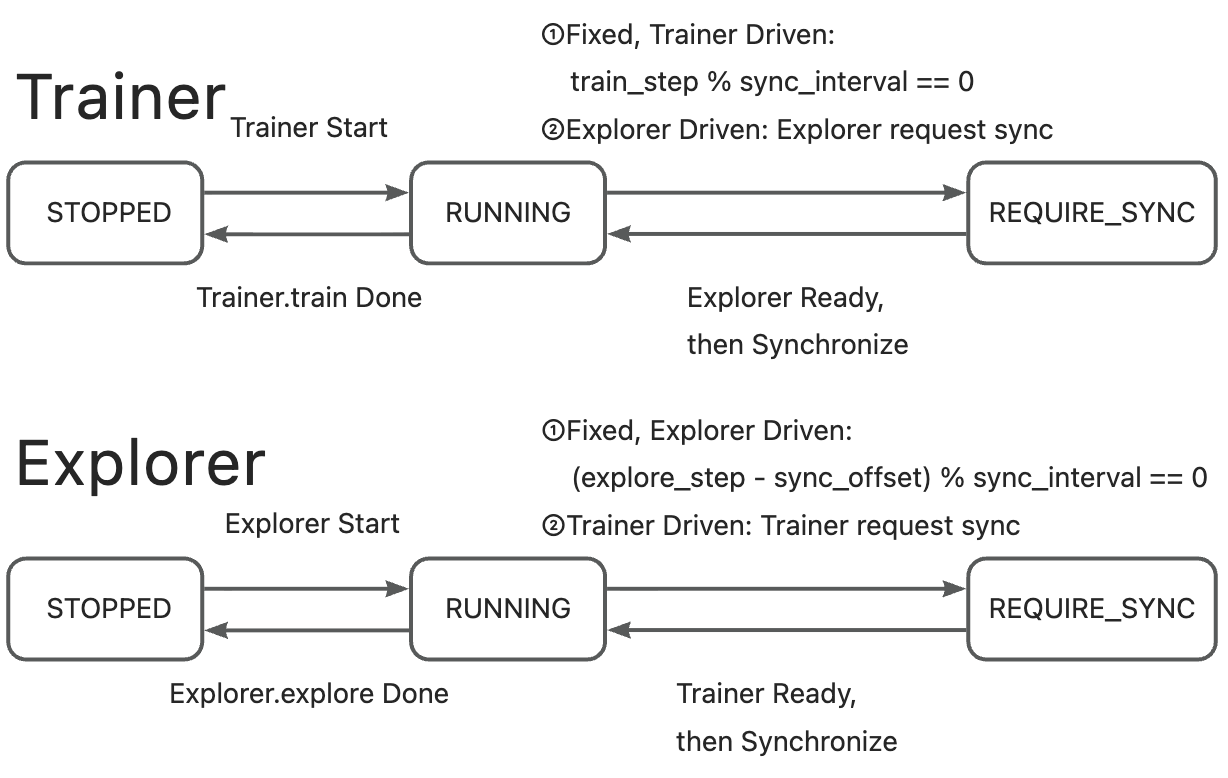
🔹 NCCL Synchronization#
Both Trainer and Explorer toggle states (
RUNNING↔REQUIRE_SYNC).Synchronization uses a “two-way handshake”: data transfer only begins once both sides are ready.
After synchronization completes, both return to
RUNNING.
🔹 CHECKPOINT/MEMORY Synchronization#
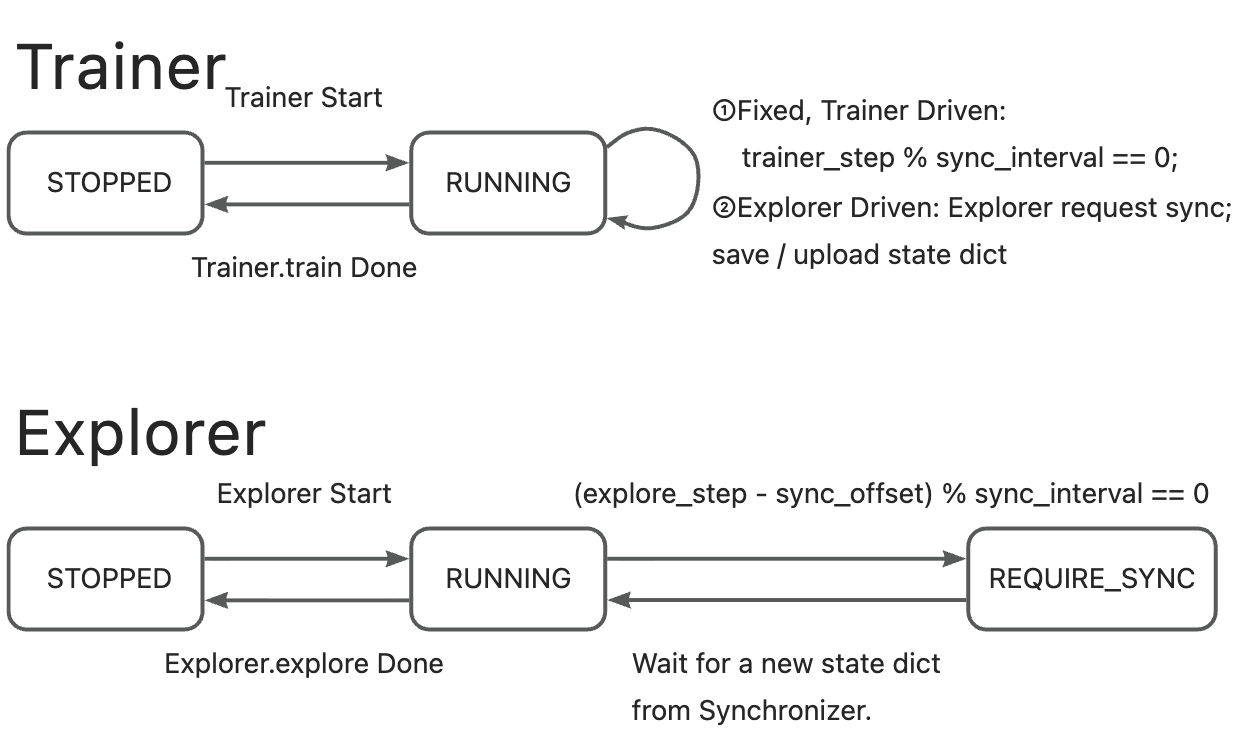
The Trainer typically remains in
RUNNINGstate (it only saves weights).The Explorer initiates the sync request (switches to
REQUIRE_SYNC), pulls the weights, then returns toRUNNING.The Synchronizer acts as an intermediary, delivering model weights to the Explorer.
Frequently Asked Questions (FAQ)#
Q1: Which synchronization method should I choose?#
Scenario |
Recommended Method |
|---|---|
Multi-GPU clusters with high-speed interconnect setups |
|
Multi-node cluster, fast memory/network |
|
Multi-node, slow disk or unreliable network |
|
Maximum compatibility (cross-platform) |
|
✅ Rule of thumb: Use
NCCLif possible. Fall back toMEMORYorCHECKPOINTbased on infrastructure.
Q2: Which synchronization style is better?#
Use Case |
Recommended Style |
|---|---|
Short episodes, quick feedback (e.g., math QA) |
|
Multi-turn interactive tasks, such as multi-round dialogues, tool usage, or multi-step games |
|
Summary: Key Takeaways#
Feature |
Why It Matters |
|---|---|
Central Coordination |
Ensures Trainer and Explorer use consistent model weights |
Multiple Sync Methods |
Adaptable to different hardware and deployment needs |
Flexible Sync Styles |
Supports both periodic and demand-driven updates |
Robust State Management |
Prevents conflicts and ensures reliability |
Closed-Loop Design |
Enables stable, efficient distributed RL training |
🎯 Bottom Line: The Synchronizer makes distributed reinforcement learning scalable, efficient, and reliable by intelligently managing when and how model updates flow between training and exploration.
Properly configuring the Synchronizer is key to an efficient and stable RL pipeline.